
dsh-plugin-voice-loop
Full-screen hands-free voice conversations for DeepSeek Harness - swappable local/cloud STT/TTS, real barge-in, adaptive VAD
安装
在 DeepSeek Harness 终端运行:
dsh plugin --profile web add zg2017/dsh-plugin-voice-loopREADME
DSH | dsh-plugin-voice-loop | Full-screen hands-free voice conversations
Voice Mode turns the composer into a full-screen, hands-free loop: tap once, talk, and the agent listens, transcribes, replies, and speaks back.
- Interrupt anytime. Just start talking - it stops (a real cancel, not just muting) and listens.
- Adapts to your room. No sensitivity slider - it tracks the room's own noise floor automatically.
- Chat or Task preset. Chat is fast, casual Q&A with reasoning off; Task is the full agent - tools, research, multi-step work.
- Local or cloud, per direction. STT and TTS each choose independently, and both point at a fully configurable endpoint - never locked to the shipped default.
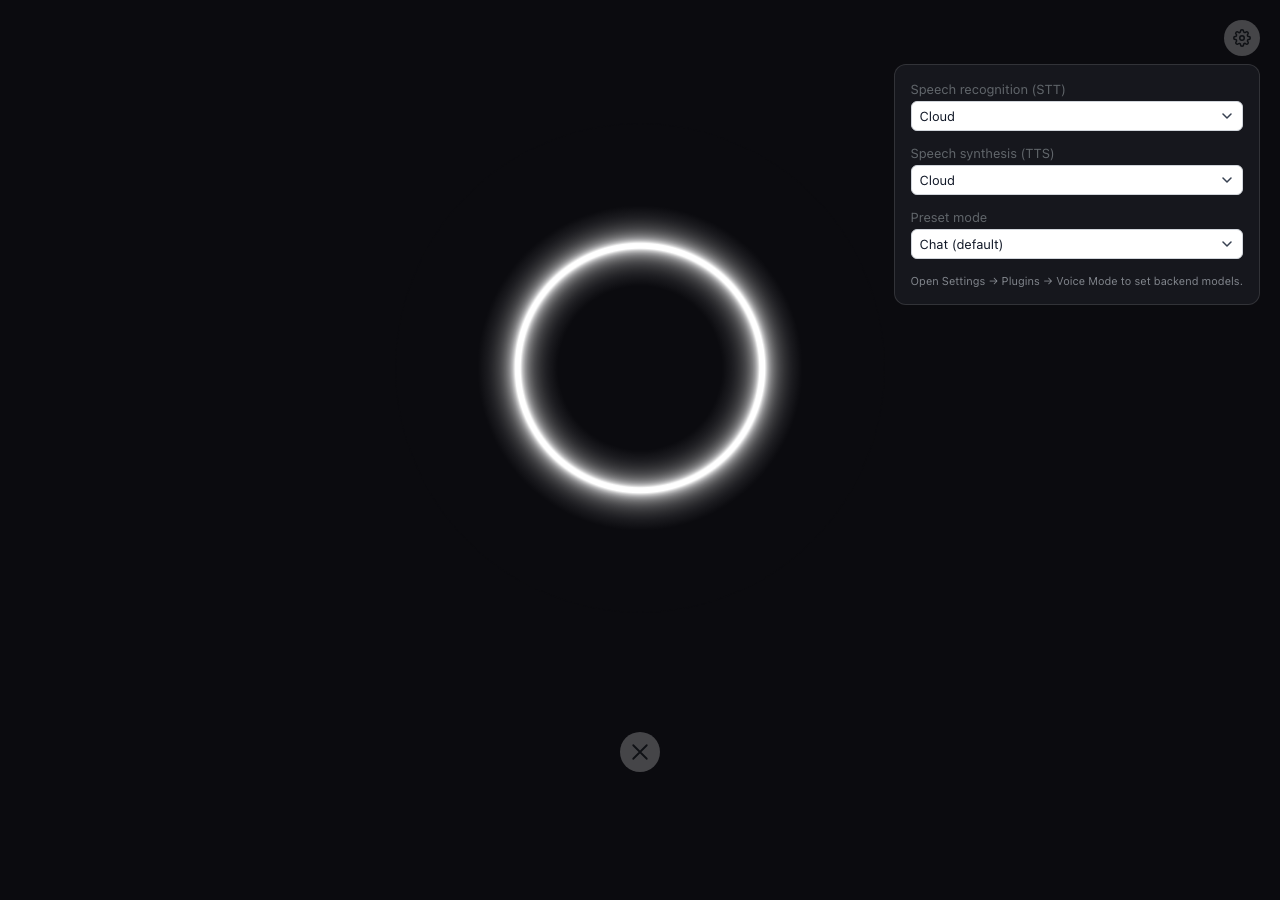
- Hot-swappable. Change backend or preset from the gear icon without leaving the call.
- Works on mobile. The full-screen overlay is a plain
position: fixedlayout with no desktop-only assumptions baked in - same call screen on a phone as on a laptop. - Minimal by design. One ring, one gear icon, nothing else - and the ring itself never cuts between states, just eases.

Install
dsh plugin --profile web add github:ZG2017/dsh-plugin-voice-loop
The composer toggle appears automatically once installed - no preset directory or persona setup needed.
How it works
1. Tap the toggle in the composer to enter voice mode - circled in red below:

2. A full-screen ring reacts to what's happening - listening, thinking, and speaking each look distinct, and it eases smoothly between them:
| Idle / listening | Thinking & processing | Speaking |
|---|---|---|
 |
 |
 |
Speak, then stop talking - a short silence auto-submits your turn. Talk over it anytime to interrupt (a real cancel, not just muting), and it goes right back to listening.
3. The reply is read aloud once it's ready - synthesized and played as one clip, not streamed out sentence by sentence. The system prompt asks for a voice-length reply so it doesn't turn into a monologue - a prompt, not a hard cap.
4. Plan reviews, questions, and approval prompts hand off to the real panel - voice mode can't answer those for you. It announces what's pending, reveals the on-screen panel, and resumes listening once you've answered.
5. A quick settings panel behind the gear icon switches STT/TTS backend and preset mode mid-call:
Configuration
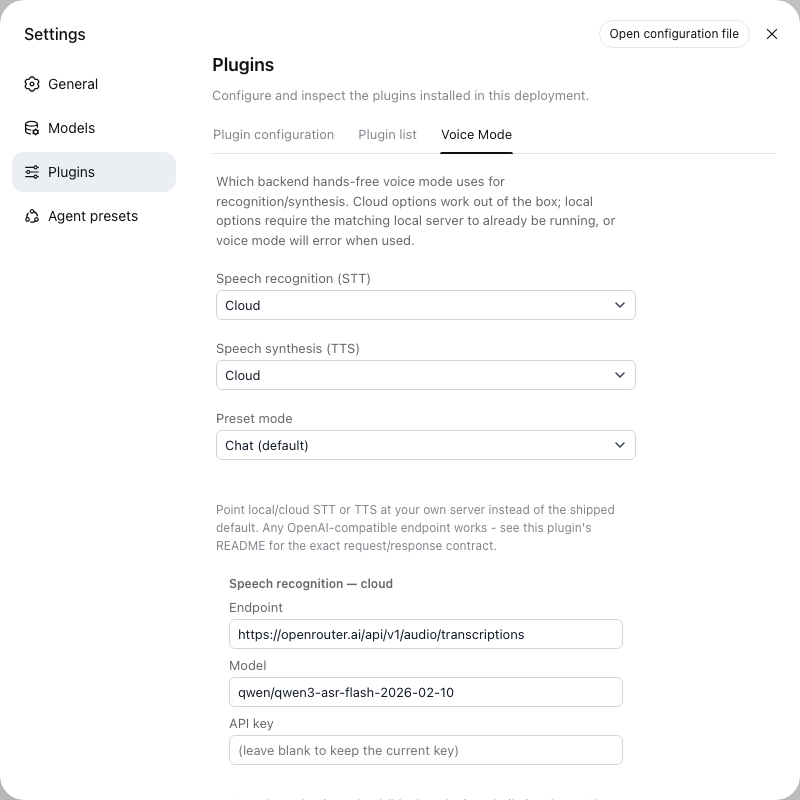
STT and TTS each have an independent local/cloud choice, and a separate endpoint/model for each of the four slots - picking "cloud" doesn't lock you into the shipped vendor. Configure all four from Settings → Plugins → Voice Mode:
Before voice mode can hear or speak anything
At least one STT and one TTS slot need real setup before voice mode works at all - nothing is pre-authenticated. The defaults, and what each needs:
| Slot | Default | What you need |
|---|---|---|
| STT - local | Qwen3-ASR-0.6B | macOS (Apple Silicon): mlx-audio's OpenAI-compatible server. Windows/Linux (NVIDIA GPU): vLLM's Qwen3-ASR recipe, or see QwenLM/Qwen3-ASR for other servers |
| STT - cloud | Qwen3-ASR-Flash | An OpenRouter API key (or set the OPENROUTER_API_KEY environment variable instead) |
| TTS - local | Qwen3-TTS-12Hz-0.6B-CustomVoice | macOS: same mlx-audio server as STT - local, serving this model instead. Windows/Linux: vLLM-Omni's Qwen3-TTS serving guide |
| TTS - cloud | Edge TTS (built in) | Nothing - works immediately |
mlx-audio is Apple Silicon-only, hence the separate Windows/Linux links. You only need the pair you actually use - cloud STT + cloud TTS needs just an OpenRouter key. A missing or wrong key/endpoint shows a real error under the ring, not a silent failure.
Pointing a slot at your own server
Any server matching one of these two contracts works - self-hosted, a different vendor, your own proxy:
| Slot | Contract |
|---|---|
| STT (local or cloud) | POST multipart/form-data with file + model → JSON {"text": string} |
| TTS (local or cloud) | POST JSON {model, input, voice, lang_code, response_format:"mp3"} → raw audio bytes |
Leave apiKey blank if your server doesn't need one. The local-voice field suggests the shipped model's own speakers (vivian, serena, uncle_fu, ryan, aiden, ono_anna, sohee, eric, dylan) but isn't validated, since a swapped model has its own names.
How it integrates with DSH
- A
conversation.input.leftregistrant (ComposerVoiceMode) mounts the toggle and, once active, the full-screenVoiceModeView, portaled todocument.body. - The client watches the session's own streaming reply text (the same live projection DSH's chat UI renders progressive text from) to know the moment a reply has actually finished, then sends the whole thing to speech synthesis in one request.
- Interrupting mid-reply calls
connection.api.sessions.cancel()- the same RPC the core composer's own stop button uses - so an interrupted turn is genuinely cancelled server-side (tool calls and all), not just muted on the client. - A
settings.plugins.tabregistrant exposes the same choices plus the endpoint/model/key editor, so everything can be set up before ever entering voice mode. ctx.systemPrompt.section()adds voice-mode instructions (brief, conversational, no markdown, a concrete spoken-length target) only while a session has voice mode active, plus a Chat-preset-specific steer-away-from-tools line when selected - this is also what keeps replies short enough to read aloud; there's no separate rewrite pass.ctx.settings.register()registers the endpoint/model/key schema, giving it a real form in DSH's own Settings page;/dsh-voice-mode-api/settingsreads/writes it for the tab above.- Everything else - transcription and synthesis - is plain
webServer.register()HTTP routes, no Typert RPC.
Known limitations
- Speech recognition doesn't stream. Each turn is transcribed once, after you stop talking, not incrementally while you're still speaking.
- Barge-in's detection relies on your browser's own echo cancellation to tell you apart from the reply's audio. Reliability varies by browser/OS, and headphones sidestep it entirely. The cancellation itself, once triggered, is real.
Compared to other DSH voice plugins
A few other plugins cover similar ground: erkkimon/dsh-plugin-voice-mode adds a record button to the composer; dsh-voice-talk is a phone-call layout docked beside the transcript; haoku123/dsh-voice has real barge-in but plain terminal chrome; PerryLink/dsh-talk focuses on backend breadth over visuals. This plugin is the only one that takes over the whole screen with one continuously-animated ring, the only one with a Chat/Task preset switch, and the only one where STT and TTS each independently pick local vs. cloud.
Unofficial project, independently developed and maintained by a community member. Not affiliated with or endorsed by DeepSeek.
评价与评分
登录后即可为该插件评分和评价。
还没有人评价这个插件,来抢个沙发吧!