
dsh-cloudflare-access
Cloudflare Zero Trust access for DeepSeek Harness (DSH). Access 认证、Tunnel 与 DNS 配置,无需公网 IP。
安装
在 DeepSeek Harness 终端运行:
dsh plugin --profile web add sevoniva-labs/dsh-cloudflare-accessREADME
Cloudflare 零信任接入


Cloudflare Zero Trust access for DSH: authenticate with Cloudflare Access and reach your self-hosted Harness through Cloudflare Tunnel, without a public IP or inbound ports.
为 DeepSeek Harness 提供基于 Cloudflare Access 和 Tunnel 的远程访问。主机无需公网 IP,也无需开放入站端口。
插件管理 Access 应用、访问策略、Tunnel 和 DNS,登录由 Cloudflare 处理,不另建用户账号。
仅适用于主机所有者和可信管理员。所有获准用户共享同一个 Harness 的会话、文件和工具权限,不提供用户隔离。
For owners and trusted administrators only. Authorized users share the same Harness sessions, files, and tool permissions; there is no per-user isolation. This is an independent community plugin, not an official DeepSeek or Cloudflare product.
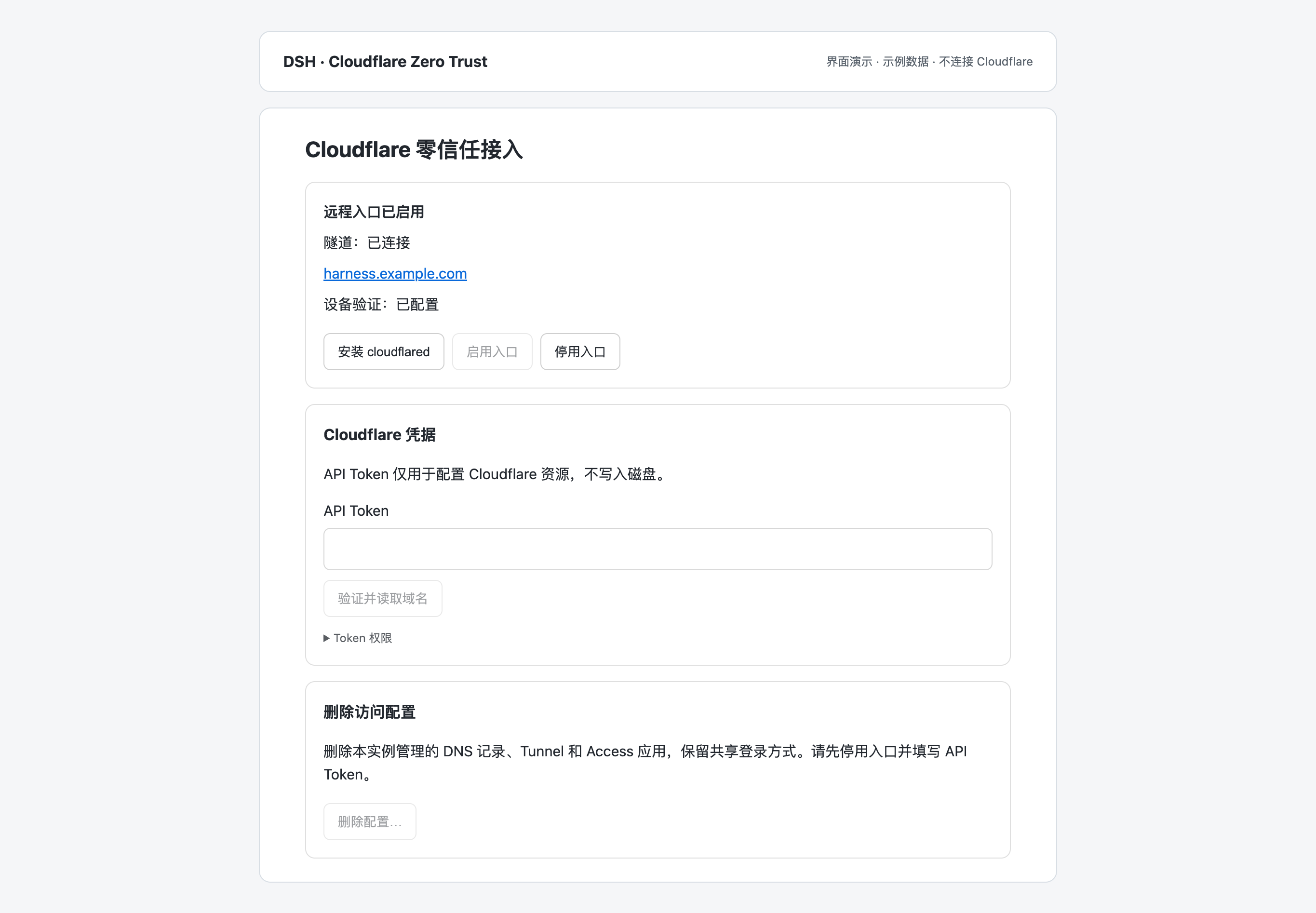
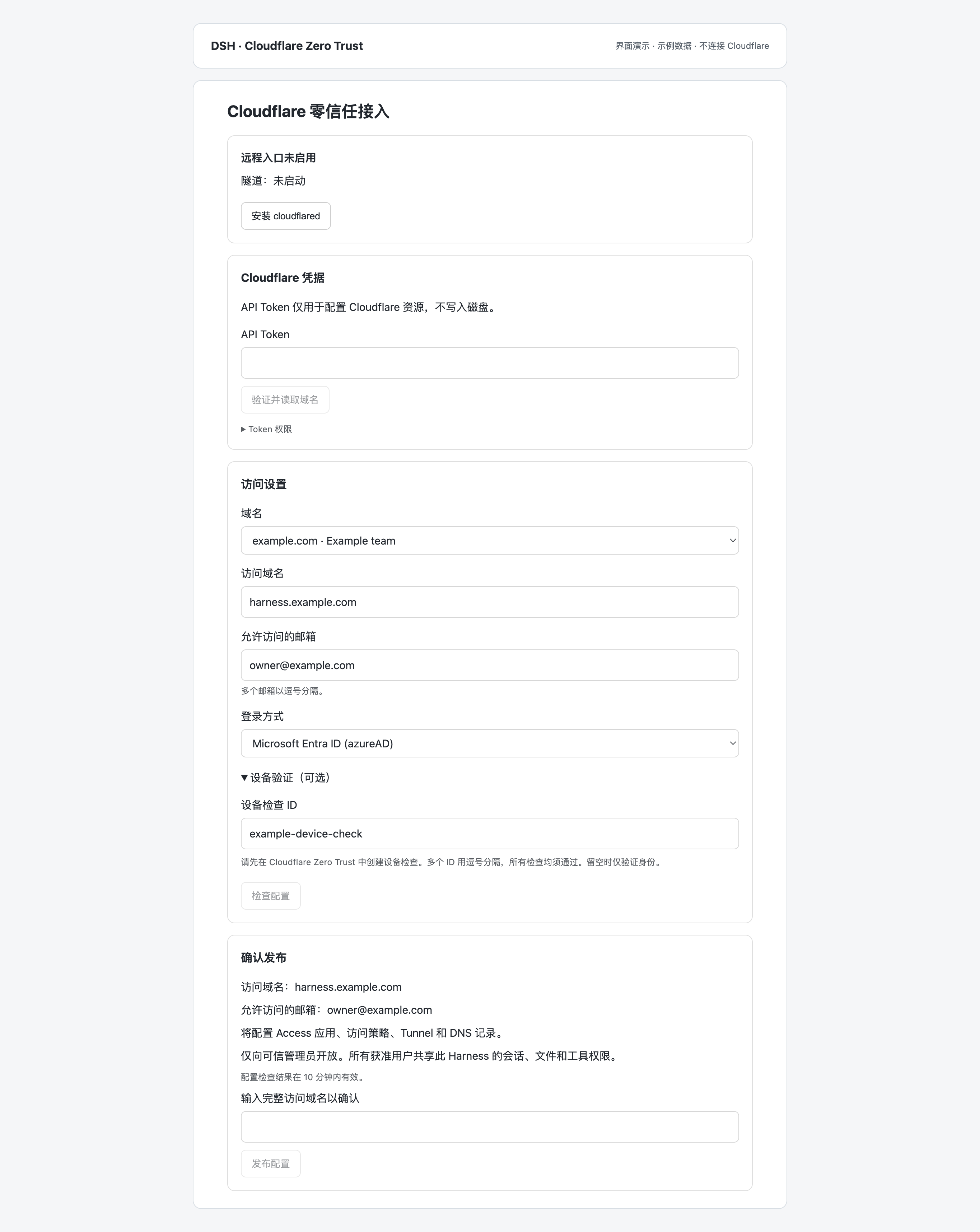
界面预览
插件设置页,使用示例数据展示,未连接实际 Cloudflare 部署。
使用前提
- 已安装官方 DSH
0.1.6-alpha.2,使用 Node.js22.19.0或更高版本。 - Cloudflare 账号已初始化 Zero Trust,并托管要使用的域名。
- 使用尚未配置 DNS 或 Access 应用的子域名,例如
harness.example.com。 - Harness 主机能够连接 Cloudflare,远程使用期间保持运行。
当前版本为 0.1.0-alpha.12(预发布)。macOS 已完成部署验证;Linux arm64/x64 支持自动安装,尚未完成部署验证。Windows 暂不支持自动安装。其他 DSH 版本尚未验证。
安装与配置
dsh plugin --profile web add github:sevoniva-labs/dsh-cloudflare-access#v0.1.0-alpha.12
dsh --profile web --host 127.0.0.1
也可从 Releases 下载 .tgz 安装包,按同页 SHA256SUMS.txt 校验后安装。
npm 包名为 @sevoniva/dsh-cloudflare-access。预发布版本使用 alpha 标签,不作为稳定版本发布。
在主机上打开 DSH 输出的本机启动链接,进入 设置 → Cloudflare 零信任接入:
- 安装 cloudflared,或指定已有官方可执行文件的路径。
- 填写 Cloudflare API Token,选择域名,填写访问子域名并选择登录方式。
- 填写允许访问的邮箱。需要可信设备限制时,填写已有的设备检查 ID。
- 点击“检查配置”,核对资源和访问权限,输入完整访问域名后点击“发布配置”。
- 等待隧道连接成功,再通过 HTTPS 域名登录。
API Token 仅用于配置操作,不持久保存。插件不会覆盖其他部署的 DNS、Access 应用或 Tunnel。设备检查必须预先在 Cloudflare Zero Trust 中配置;只设置邮箱白名单不代表启用了设备验证。
API Token 权限
将 Token 的资源范围限定到目标账号和 Zone,不使用 Global API Key。
| 范围 | 权限 |
|---|---|
| Account | Cloudflare Tunnel: Edit |
| Account | Access: Apps and Policies: Edit |
| Account | Access: Organizations, Identity Providers, and Groups: Read |
| Zone | Zone: Read;DNS: Edit |
| 自动创建邮箱验证码登录方式时 | Identity Providers: Edit |
| 使用设备检查时 | Access: Device Posture: Read |
具体名称以 Cloudflare API 权限表 为准。
本机配置
可在所用 profile 的 cordis.patch.yml 中覆盖配置:
- id: dsh-cloudflare-access
  name: '@sevoniva/dsh-cloudflare-access'
  config:
    instance: web
    gatewayPort: 3082
    maxTokenAgeSeconds: 7200
    # cloudflaredPath: /absolute/path/to/cloudflared
    # dataDir: /absolute/path/to/private/state
Harness 和插件网关都只监听 127.0.0.1,两者不能使用同一端口。默认状态目录为 $DSH_HOME/dsh-cloudflare-access/<instance>;未设置 DSH_HOME 时使用 ~/.dsh。多个实例必须使用不同的状态目录和网关端口。
插件随 DSH 启停,不安装系统服务。需要开机启动时,可通过 launchd 或 systemd 管理 DSH。
远程使用
访问链路:浏览器 → Cloudflare Access → Tunnel → 本机网关 → Harness。
- 文件目录:浏览和选择的是 Harness 主机上的目录,不是访问设备上的目录。
- 模型配置:获准用户可在模型设置中管理提供方、模型和 API Key。数据保存到 Harness 原生设置与凭据服务。
- 连接恢复:网络恢复或页面重新激活后,插件检查认证状态并协调原生重连,不重新提交任务指令。
- 登录过期:优先尝试复用 Cloudflare 登录;无法静默恢复时,在登录窗口完成认证后返回原页面。
- 静态缓存:带版本的脚本和样式使用浏览器私有缓存。适配后的脚本重新验证内容,页面、认证响应和任务数据不缓存。
新建 Access 应用的默认会话为一小时。网关另设凭据年龄上限,默认两小时;长连接受凭据到期时间和浏览器租约限制。修改会话时长不会消除重新认证的必要性,插件更新也不会放宽已有访问策略。
远程模型编辑和连接提示适配 DSH 0.1.6-alpha.2,不修改官方文件。无法识别的脚本保持原样;升级 DSH 后须验证这两项功能。页面启动仍需加载插件和会话数据,耗时取决于网络与数据量。
更新与卸载
更新时先查看目标 Release 的兼容说明,将安装命令中的 tag 替换为目标版本,安装后重启 DSH。更新前保留旧安装包和私有状态备份;备份不得放入公开仓库。
离线安装:
dsh plugin --profile web add /absolute/path/plugin.tgz
停用仅关闭本机入口和连接器,保留云端资源。完全卸载时:
- 在插件设置中停用入口。
- 重新填写 API Token,输入当前子域名并删除配置。插件只删除核对归属后的 DNS、Tunnel 和 Access 应用,共享登录方式保留。
- 删除成功后卸载插件:
dsh plugin --profile web remove @sevoniva/dsh-cloudflare-access
直接卸载不会清理 Cloudflare 资源。不要提前删除状态目录,否则可能丢失资源归属信息。更换域名或访问策略时,当前版本需要先删除原部署再配置。
开发与安全
MIT License。本项目不是 DeepSeek 或 Cloudflare 官方产品。
评价与评分
登录后即可为该插件评分和评价。
还没有人评价这个插件,来抢个沙发吧!