
dsh-ui-liteglass
v0.1.0
LiteGlass — a lightweight appearance skin for DeepSeek Harness Web UI: wallpaper, glass-like transparency, and accent color. Server-side settings, multi-device, leaves native light/dark mode alone.
兼容版本:
0.1.0-rc.7
安装
在 DeepSeek Harness 终端运行:
dsh plugin --profile web add dsh-ui-liteglassREADME
dsh-ui-liteglass
LiteGlass — English | 简体中文
A lightweight appearance skin for DeepSeek Harness.
Wallpaper. Glass. Accent. That's it.
Screenshots
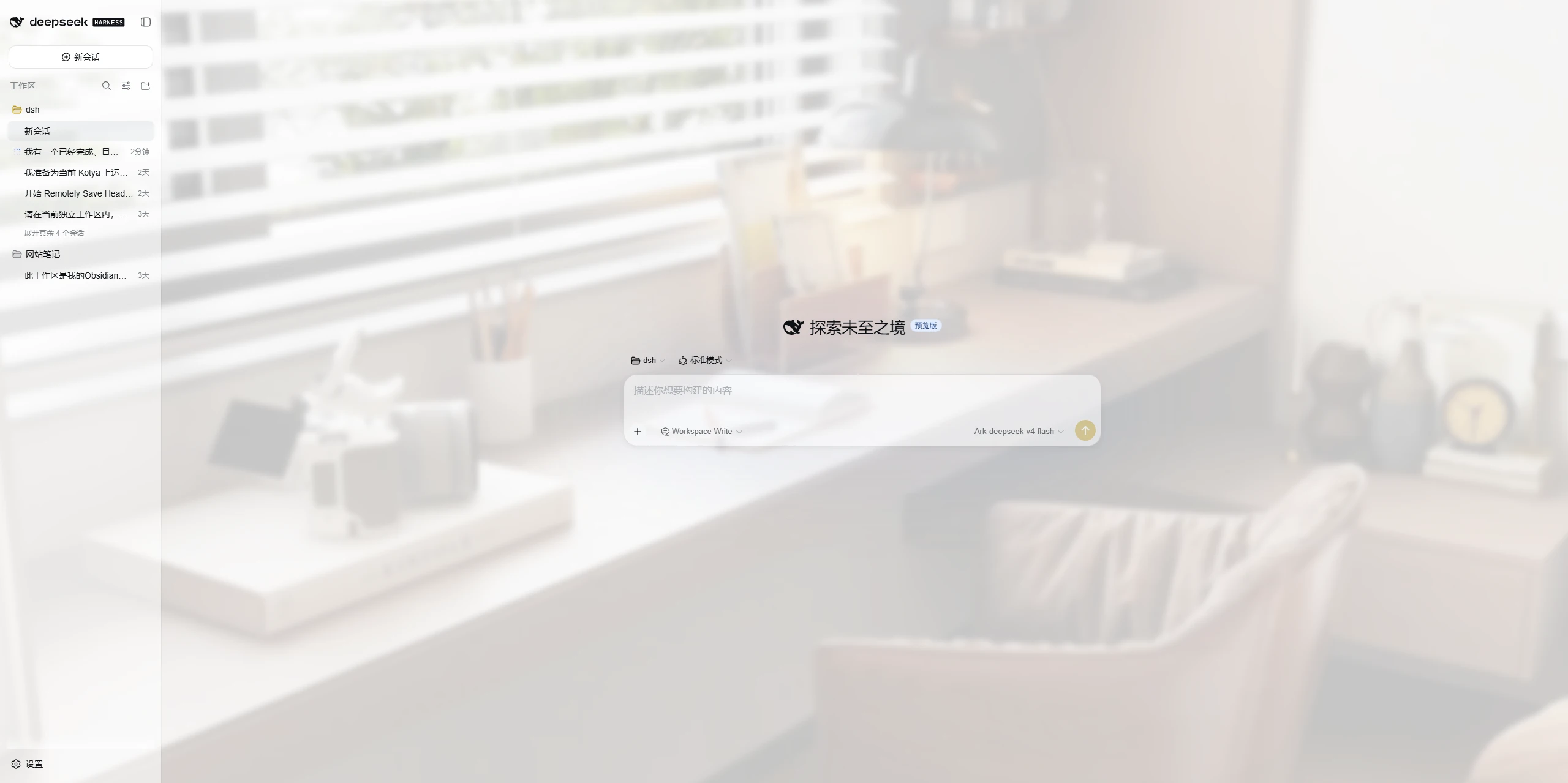
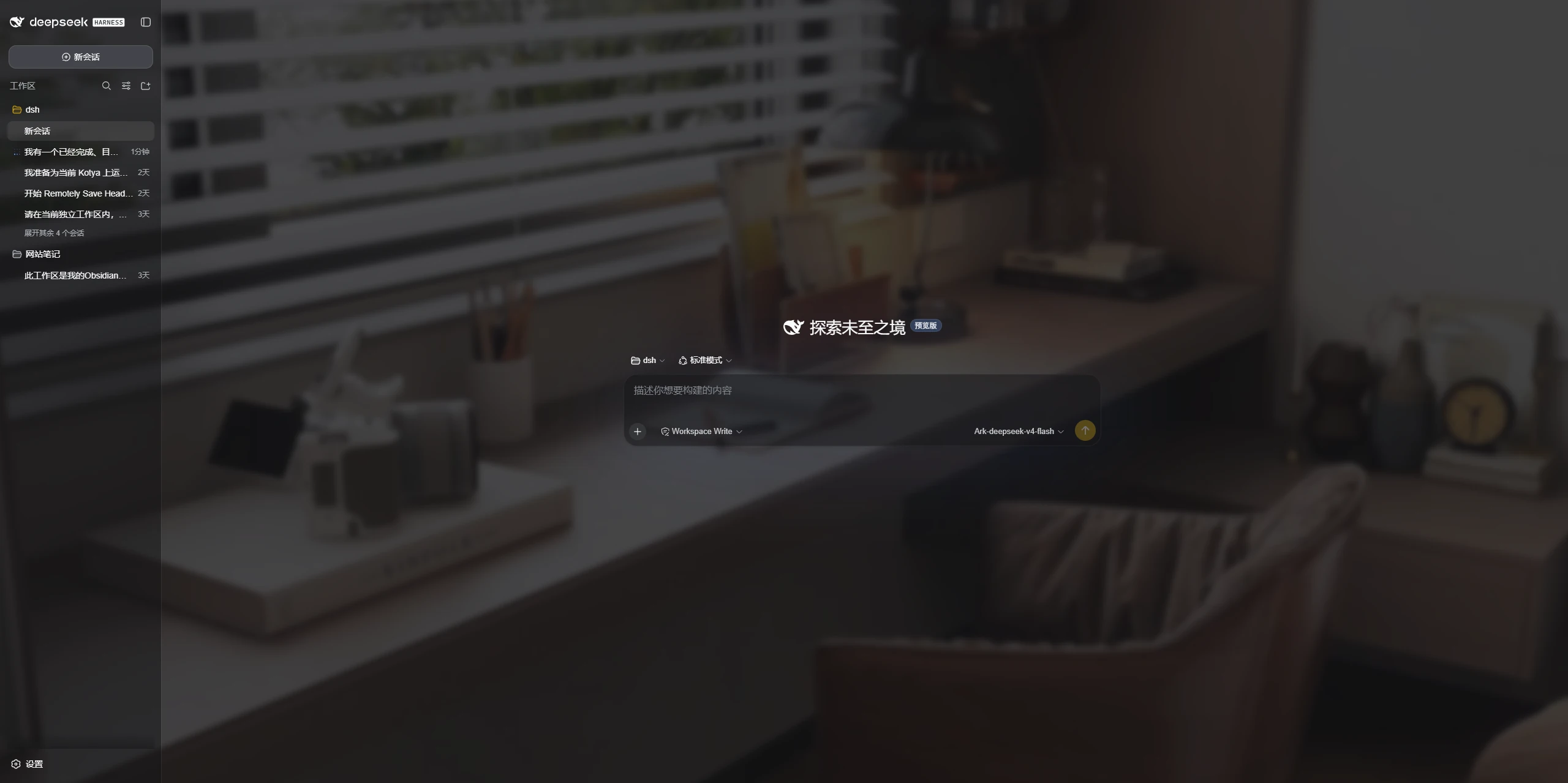
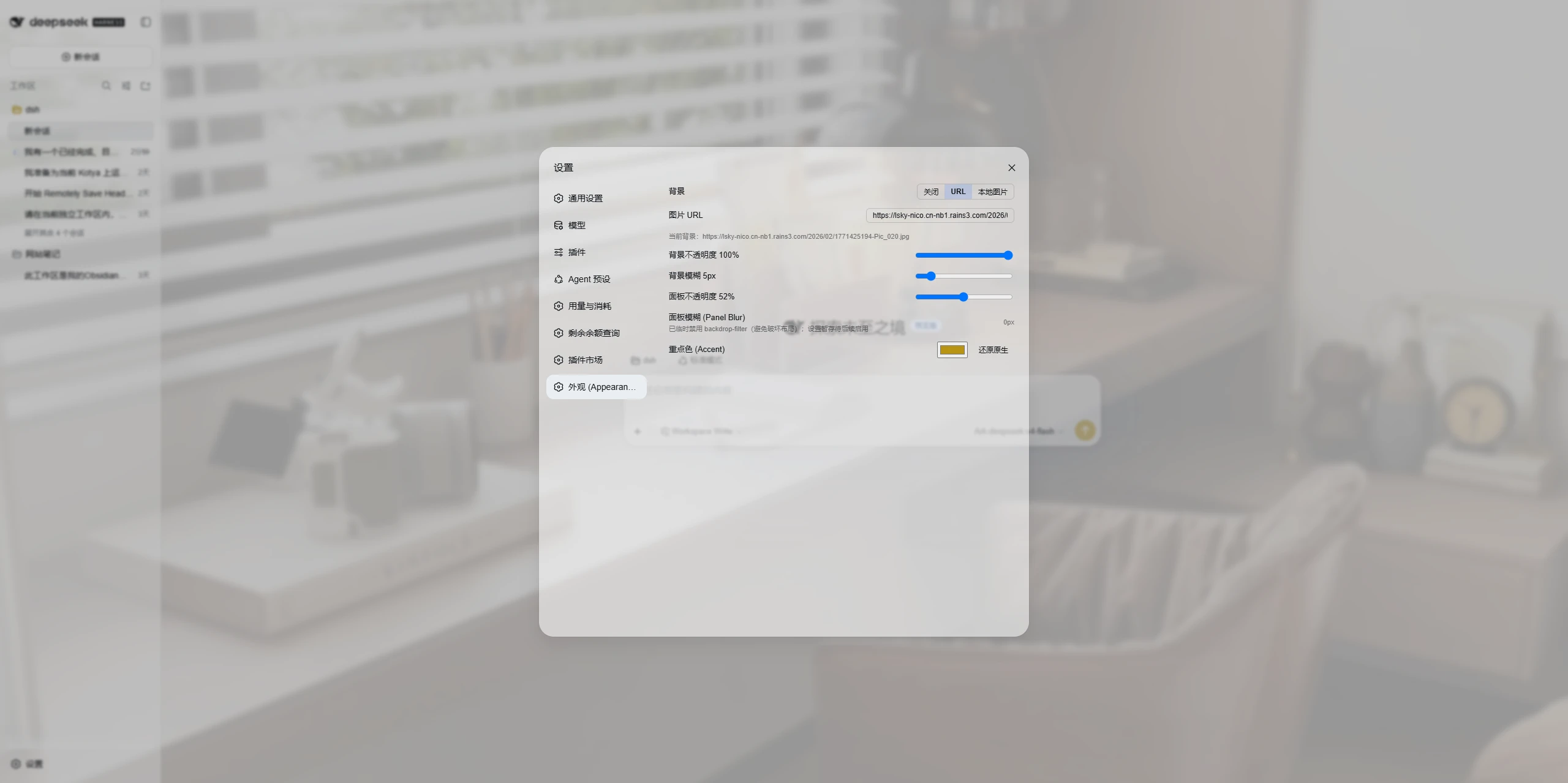
Real captures of the running plugin — light / dark main interface and the
Appearance settings — under docs/screenshots/, wired intoscreenshots.json for storefront display.
Features
Custom Wallpaper
- Remote image URL, or upload a local image
- Adjustable background opacity and background blur
Glass-like Panels
- Adjustable panel transparency for a lightweight glass-like look
Accent Color
- Customize the accent color used across supported DSH interface states
- Adapts automatically to DSH's native Light / Dark appearance
What makes it different
- Server-side persistence, multi-device. Settings and uploaded wallpaper are
stored on the DSH host (not in the browser), so every device that reaches the
host shares the same look. - Does not take over the native color mode. Light / Dark / System stays fully
owned by DSH native settings; the plugin only enhances appearance on top. - No second theme system. Built on the official
theme.overrideTokensseam
and the DSH token system — no bundled CSS framework, no competing theme model. - Small, focused, predictable. Wallpaper + glass + accent, nothing else.
Identity
| Field | Value |
|---|---|
| package | dsh-ui-liteglass |
| display name | LiteGlass |
| plugin id (client module / settings.section / theme source) | dsh-ui-liteglass |
| rowId / wiring.id (loader entry / skin-market) | ui-liteglass |
rowId matches the loader entry id in cordis.patch.yml, which is what skin
markets use for mutual-exclusion wiring. See docs/IDENTITY.md for the canonical
record.
Compatibility
- Supported: the DeepSeek Harness
0.1.0-rcline (the current release-candidate
series). The plugin uses only stable official seams (webServer,settings,theme.overrideTokens,dsh.clientinject). - Tested with: DeepSeek Harness
0.1.0-rc.7(development runtime; client theme
bundle0.1.0-rc.8).
DeepSeek Harness is still evolving quickly, so a future release may change plugin
interfaces; the supported range above is a declaration, not a promise of
forward-compatibility.
Installation
From npm (once published):
dsh plugin --profile web add dsh-ui-liteglass
Or directly from the GitHub repository (works today):
dsh plugin --profile web add git+https://github.com/mumuer1024/dsh-ui-liteglass.git
dsh --profile web
To pin a specific release, add the tag:
dsh plugin --profile web add 'git+https://github.com/mumuer1024/dsh-ui-liteglass.git#v0.1.0'
dsh plugin add initializes the profile on first use and wires the bundle
automatically. After that, start the Web UI and open Settings → Appearance.
Configuration
Open Settings → Appearance (the plugin adds its own section there):
- Background: Off / URL / local upload; background opacity; background blur.
- Panel transparency: how translucent the main surfaces are.
- Accent color: pick a color, or reset to the native value.
Changes are saved to the server and shared across devices that reach the DSH host.
Uninstallation
dsh plugin --profile web remove dsh-ui-liteglass
Removing the plugin restores the original appearance. Note that uploaded
wallpaper files and the plugin config under $DSH_HOME/ui-liteglass/ are not
removed by the uninstall command — delete that directory manually if you want
them gone.
Known Limitations
- Panel blur (
backdrop-filter) is currently not enabled. Applying a
backdrop blur to the main panel containers breaks Settings / overlay
positioning in the current build, so that effect is disabled. Background blur
and panel transparency are functional and are not affected. - The color mode (Light / Dark / System) is always controlled by DSH native
settings — this plugin does not provide a color-mode switch.
Development / Testing
Automated Node test suites cover the host routes, the client state model, and the
no-color-mode guarantee:
node test/host-smoke.mjs && node test/lifecycle.mjs && node test/no-appearance.mjs
npm publish runs the same suites via prepublishOnly. Seedocs/ARCHITECTURE.md for design details.
License
评价与评分
登录后即可为该插件评分和评价。
还没有人评价这个插件,来抢个沙发吧!