
dsh-liang-skin
DeepSeek Harness 滑动变阻器皮肤
安装
在 DeepSeek Harness 终端运行:
dsh plugin --profile web add kingOfSoySauce/dsh-liang-skinREADME
滑动变祖 · DeepSeek Harness 皮肤
安装
方法一, 提示词安装:
复制以下提示词给 DSH;会先排查冲突再安装,所以较长:
请把“滑动变祖”皮肤安装到 DSH 的 web profile。必须先检查冲突,确认可以继续后再安装。

1. 安装前只读检查 web profile 的 package.json(dependencies 与 dsh.profile.bundles)、profile 的 cordis.patch.yml 和 $DSH_HOME/cordis.patch.yml(如有)。
2. 从当前启用的 bundles 中识别其他皮肤、主题或外观插件:排除 @deepseek-ai/dsh-base、@deepseek-ai/dsh-web-app、dsh-skin-market 和本次目标 dsh-client-liang-intensity-skin;读取候选 package.json 的名称、描述、dsh.client/dsh.bundle 声明,必要时再读 README。
3. 如果发现其他已启用的皮肤插件,列出它们并停在安装前,提醒我先停用;未经我确认不得修改任何 profile 文件,也不得执行安装。
4. 如果没有冲突,明确说“未检测到其他已启用的皮肤插件”,然后执行:

dsh plugin --profile web add 'github:kingOfSoySauce/dsh-liang-skin'

5. 安装后读取 web profile 的 package.json,确认 dependencies 和 dsh.profile.bundles 中都有 dsh-client-liang-intensity-skin;再检查目标 package.json 的 dsh.client/dsh.bundle 声明和 liang-intensity-skin loader 注册项。任一缺失都要报告安装或注册失败。
6. 告诉我如何重启 DSH Web。不要替我安装、停用或卸载其他皮肤。
更多 DSH 皮肤
更多社区皮肤,点击在线浏览皮肤市场
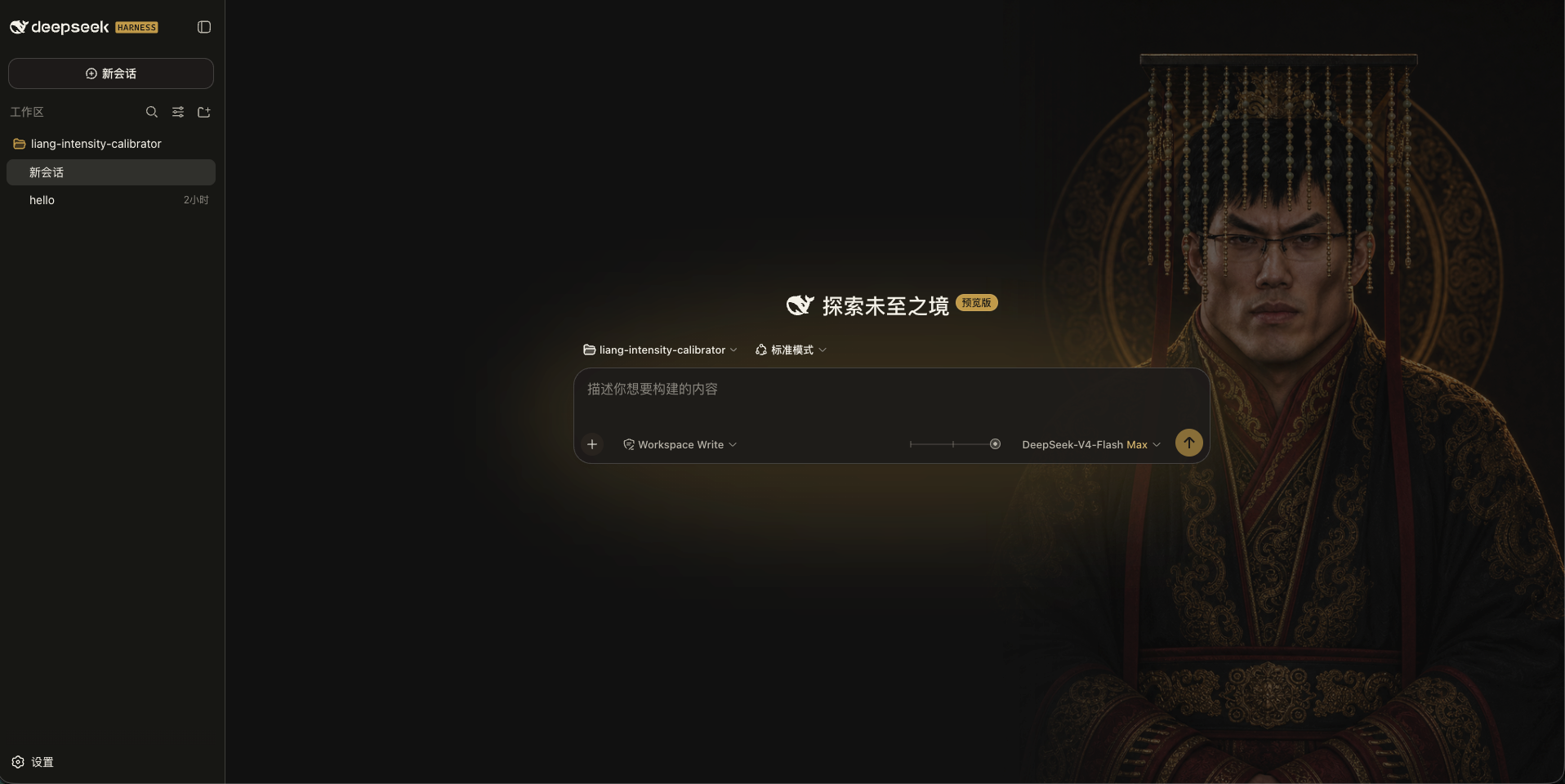
效果展示
|
交互规则
- 档位直接读取当前模型的
reasoning.efforts,不写死数量或名称。 - 任意 N 个档位均匀落在 0–30:两档为
0 / 30,三档为0 / 15 / 30,五档为0 / 7.5 / 15 / 22.5 / 30。 - 拖动期间只做连续视觉预览;指针松开、键盘操作完成或控件失焦时,才吸附到最近档位并通过官方 ModelDirectory 提交该档位原始 ID。
- 不支持推理或只有一个可选档位的模型不显示滑块。
- addressed subagent 不显示也不提交滑块。
外观开关
入口位于 设置 → 通用设置 → 外观皮肤:
滑动变祖:显示滑块并启用人物、背景和自适应配色。原生:移除背景层、皮肤变量和滑块,恢复 Harness 原生界面。
选择保存在当前浏览器本地,不会改动模型配置。
命令安装
需要先安装 DeepSeek Harness;当前版本已在 0.1.0-rc.6 上验证。安装本身可以在 DSH 运行时执行(只改动磁盘配置),重启后生效。三种方式任选其一:
安装前请确保已关闭其他皮肤插件,避免冲突。
方式一:从 GitHub 安装最新版(推荐)
dsh plugin --profile web add 'github:kingOfSoySauce/dsh-liang-skin'
dsh --profile web --dump-config | grep -B1 -A2 liang-intensity
方式二:从 GitHub Release tarball 安装
从本仓库 Releases 页面下载 dsh-client-liang-intensity-skin-0.1.7.tgz(包内已包含构建好的 lib/client.js,安装时不需要执行任何 prepare 脚本),然后:
dsh plugin --profile web add ./dsh-client-liang-intensity-skin-0.1.7.tgz
适合不方便走 git 的环境;相对路径按你运行命令的目录解析。
方式三:克隆后从本地路径安装(开发迭代)
git clone https://github.com/kingOfSoySauce/dsh-liang-skin.git
cd dsh-liang-skin
dsh plugin --profile web add .
dsh plugin 会把相对路径锚定到你运行命令的目录(而不是 profile 目录),所以在克隆目录里执行 add . 装的是指向克隆目录的 link 依赖:改完源码运行 npm run build,重启 DSH 即生效,无需重新安装。
验证与重启
安装成功后 dsh plugin 会自动把插件注册进 profile 的 dsh.profile.bundles(见 ~/.dsh/profiles/web/package.json),无需手动改配置;--dump-config 的输出中应出现 dsh-client-liang-intensity-skin 配置层(上面命令里的 grep 就是为此准备的)。
如果正式 DSH 正在运行,让执行安装的 agent 给用户两个选择:
- a. agent 自行重启:agent 终止旧进程后重新运行
dsh web; - b. 用户手动重启(推荐):在运行 DSH 的终端按 Ctrl+C,再运行
dsh web。
重启后浏览器会自动加载新的客户端插件,无需强制刷新。当前会话会中断,但 DSH 会话有磁盘持久化,重启后可以恢复。
卸载
dsh plugin --profile web remove dsh-client-liang-intensity-skin
remove 会自动把插件从 dsh.profile.bundles 中摘除;重启后设置入口完全移除。
常见问题
- pnpm 阻止构建脚本:pnpm ≥ 10 默认不执行第三方依赖的 build/prepare 脚本。当前皮肤没有 prepare 脚本,正常不会触发;若 pnpm 安装失败并给出提示,按 dsh 打印的说明在
~/.dsh/profiles/web/pnpm-workspace.yaml的allowBuilds下加入对应 key 后重试。 - 网络:方式一需要能访问 github.com(pnpm 经 codeload 拉取);方式二只需能下载 GitHub Release 附件。
- pnpm 缺失:
dsh plugin依赖 PATH 里的 pnpm,缺失时会明确提示。 - 端口占用:
dsh web默认监听 3080(可用--port修改),重启前确认旧进程已退出。
本地开发
npm install
npm test
npm run build
修改 client 源码后需要运行 npm run build,并一起提交更新后的 lib/client.js 和 source map。
灵感与素材来源
本插件的“滑动变祖”视觉概念与人物图片素材源自
Lichtspektrum/liang-intensity-calibrator。插件在原项目 0–30 强度轴的基础上,将视觉变化接入 DeepSeek Harness 的推理等级选择。
运行时素材已包含在插件中,安装后不需要额外下载。当前接入 24 张经过审核的人像锚点,滑动时直接切换最近锚点,不做图片交叉渐变。
评价与评分
登录后即可为该插件评分和评价。
还没有人评价这个插件,来抢个沙发吧!