
dsh-catppuccin-theme
DeepSeek Harness Web GUI 的 Catppuccin 主题插件:Latte / Frappé / Macchiato / Mocha 四种主题一键切换,内置可开关的玻璃质感(Glassmorphism)
安装
在 DeepSeek Harness 终端运行:
dsh plugin --profile web add NoNameLeGo/dsh-catppuccinREADME

 Catppuccin for DeepSeek Harness





中文 | English
目录
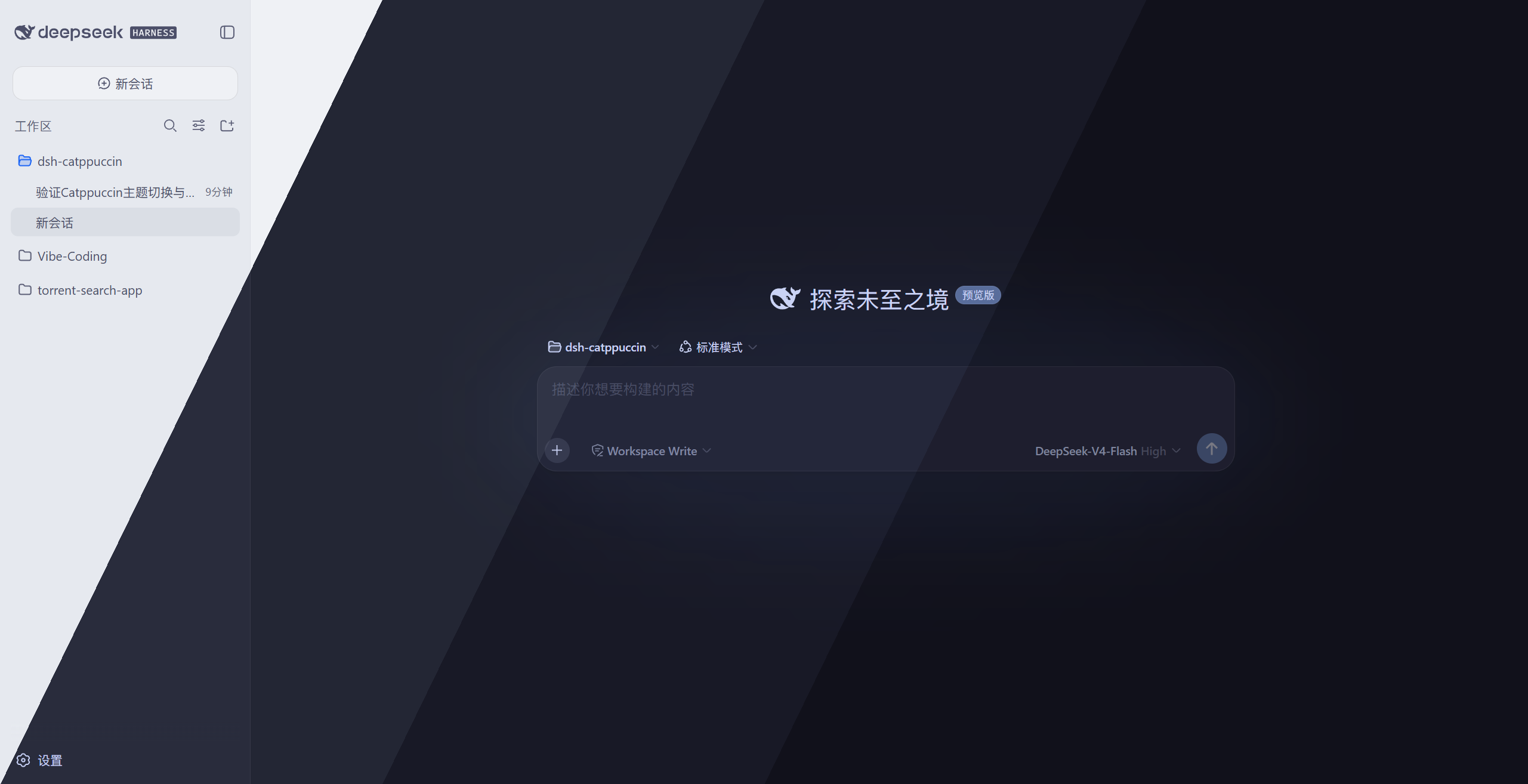
简介
DeepSeek Harness 的
Catppuccin 主题插件——一个包同时适配
Web GUI(dsh web)、DSH Desktop 与 dsh-TUI 终端:Web / 桌面端做全界面换色与玻璃质感,
TUI 端自动同步四套官方主题色板。
它内置 Catppuccin 的四个主题——Latte、Frappé、Macchiato、Mocha——
把整个界面的配色都换成对应的 Catppuccin 色板;并在 设置 → 常规 → 外观
下方提供一行 Catppuccin 快捷切换,选择会自动保存、重启自动恢复。
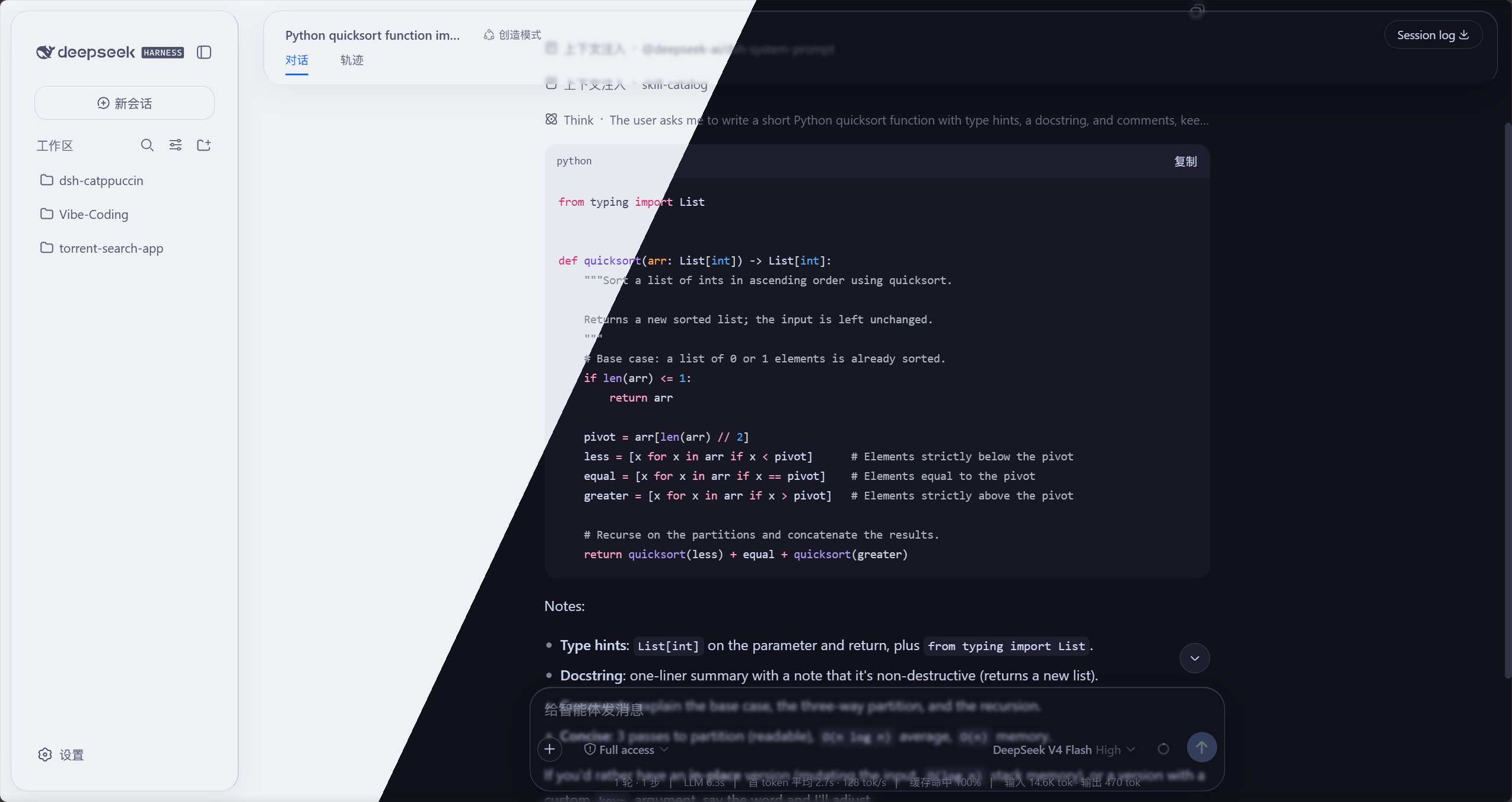
同时内置一套可开关的玻璃质感(Glassmorphism)皮肤:顶栏、侧边栏、
输入框、统计行、轨迹视图、聊天气泡、新会话按钮都变成磨砂玻璃卡片,
模糊度、磨砂度、背景亮度均可自由调节,玻璃颜色自动跟随当前
Catppuccin 主题。
特性
- 🎨 四个主题:Latte(浅色)、Frappé / Macchiato / Mocha(深色)
- 🧩 接入官方主题系统,与内置浅色 / 深色 / 跟随系统主题平级
- 🎯 全界面配色覆盖,不只是一两个强调色
- ⚙️ 设置页一行切换,选择自动保存、重启自动恢复
- 🌐 中 / 英 / 日 / 韩 / 西 / 法 / 德七语文案(跟随系统语言)
- 🪟 玻璃质感:顶栏 / 侧边栏 / 输入框 / 统计行 / 轨迹视图 / 聊天气泡 /
新会话按钮磨砂玻璃效果,设置里一键开关;云母 / 兼容双模式,模糊度、磨砂度、
背景亮度自由调节(交互参考 DSH-Transparent-UI-Plugin) - 🌫️ 玻璃拟态细节:页面上下边缘渐变模糊、折叠侧边栏悬浮玻璃、
纯色背景跟随主题底色——内容滚入视口边缘时柔化穿过,层次更立体 - 🎨 玻璃配色自动跟随当前 Catppuccin 主题
- 🔄 检查 Catppuccin 插件更新:设置页一键检测本插件(dsh-catppuccin)在 npm 上的最新版本,发现新版直接给出可复制的升级命令
- 💻 dsh-TUI 终端主题:一条安装命令装进 dsh-TUI,四套主题自动同步到
~/.dsh-tui/themes/,见安装 · dsh-TUI
预览
四个主题在 DeepSeek Harness 中的实际效果(截图来自本地 GUI,文首大图为四主题斜切合成):
🌻 Latte(浅色)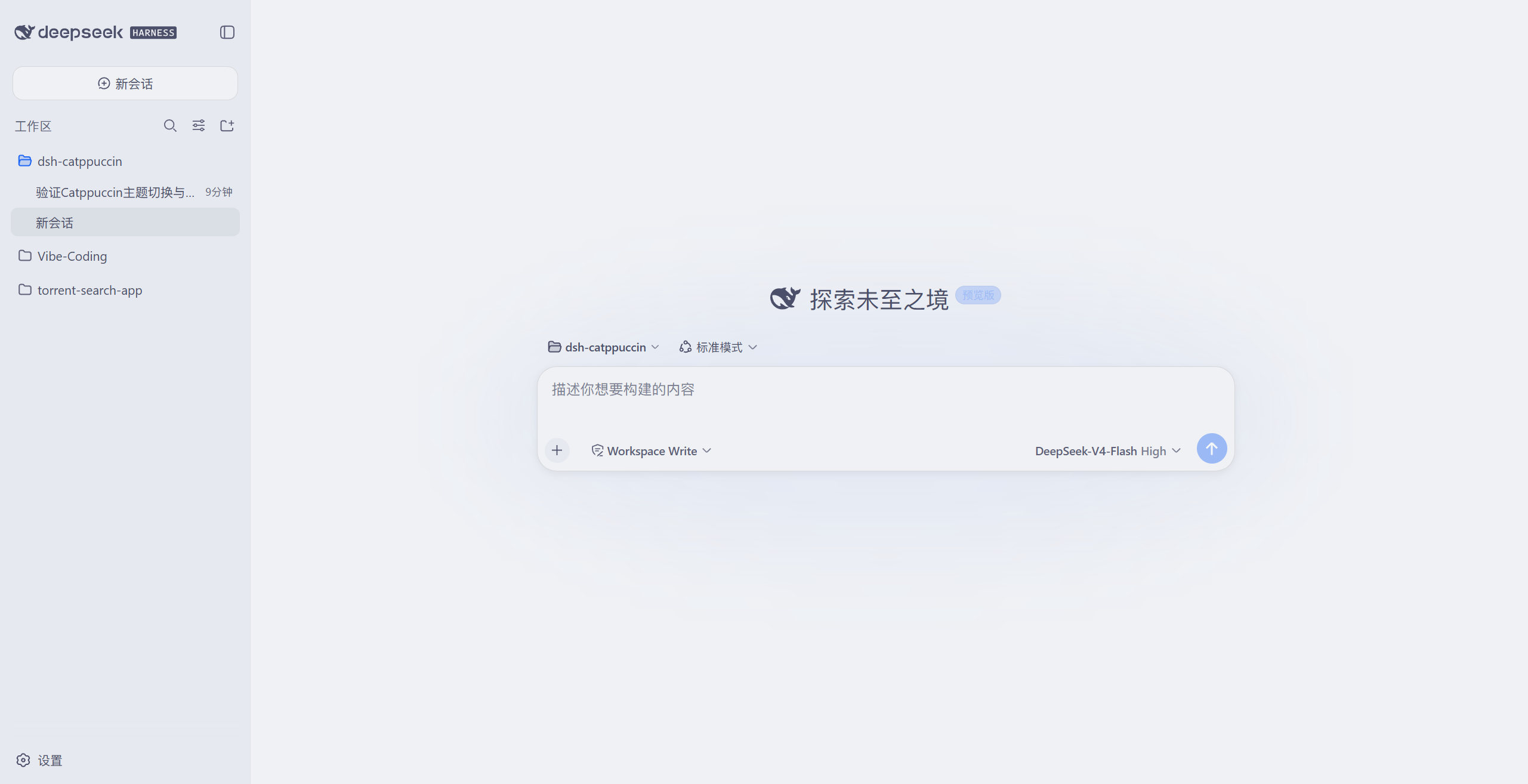 🪴 Frappé(深色)
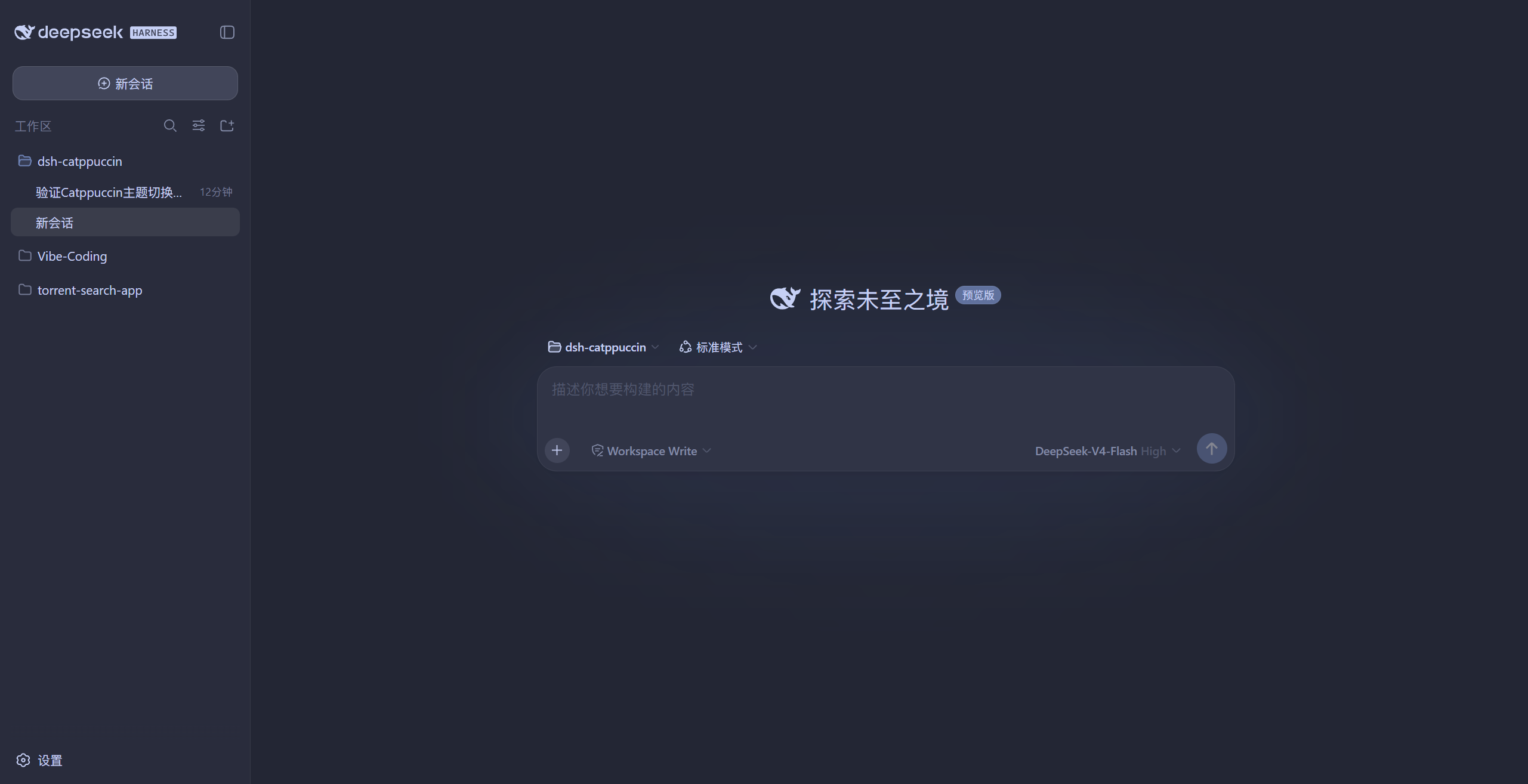 🌺 Macchiato(深色)
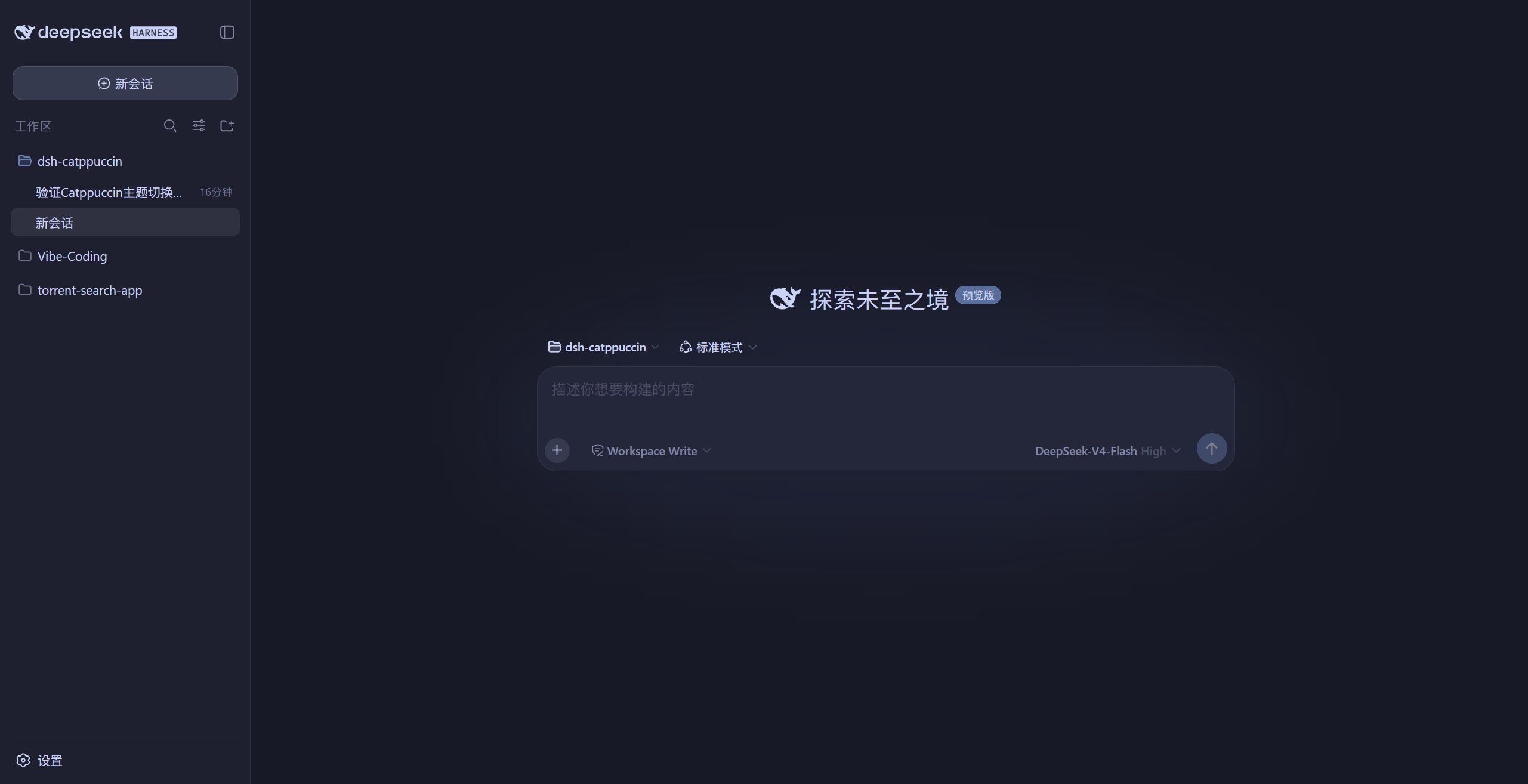 🌿 Mocha(深色)
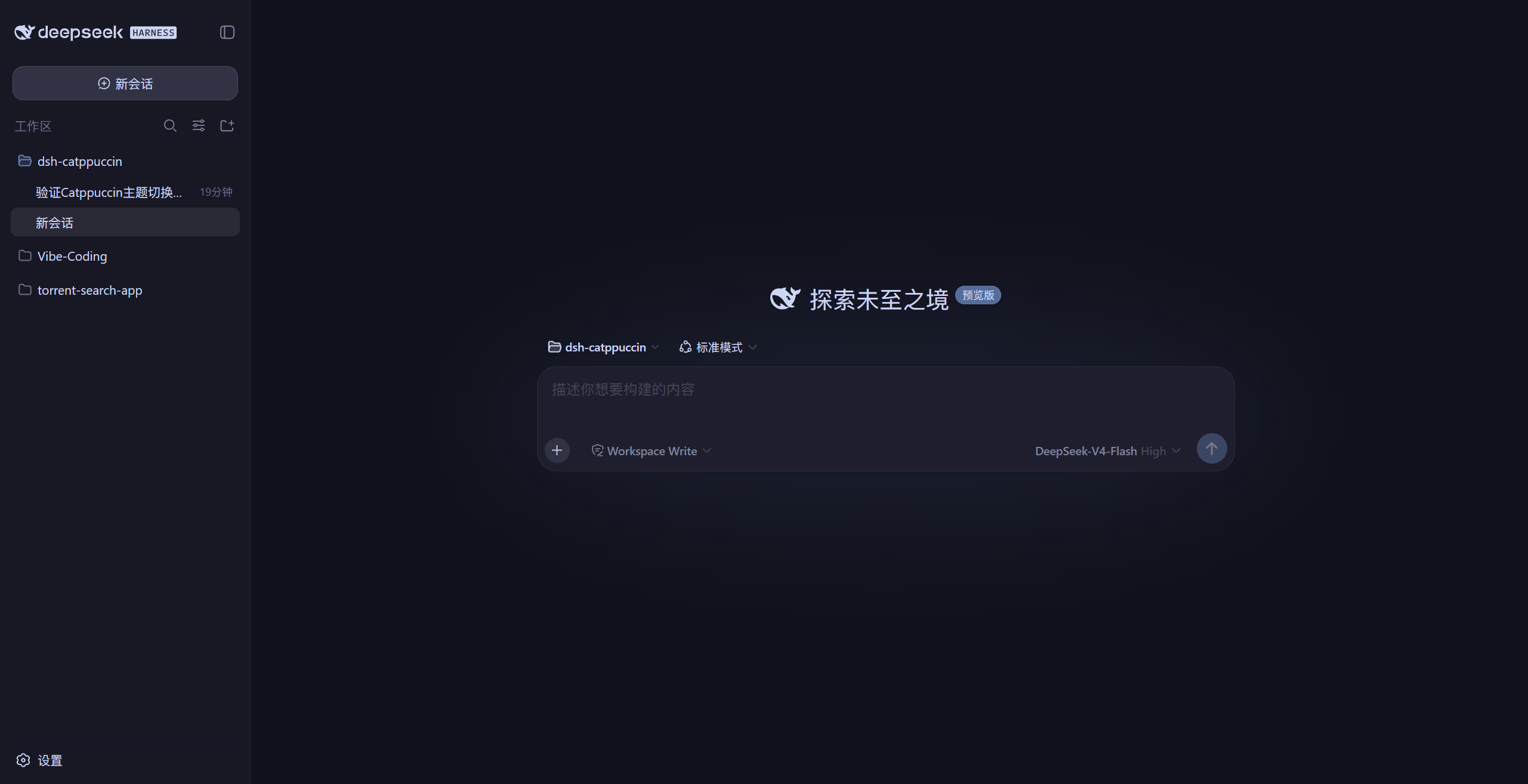
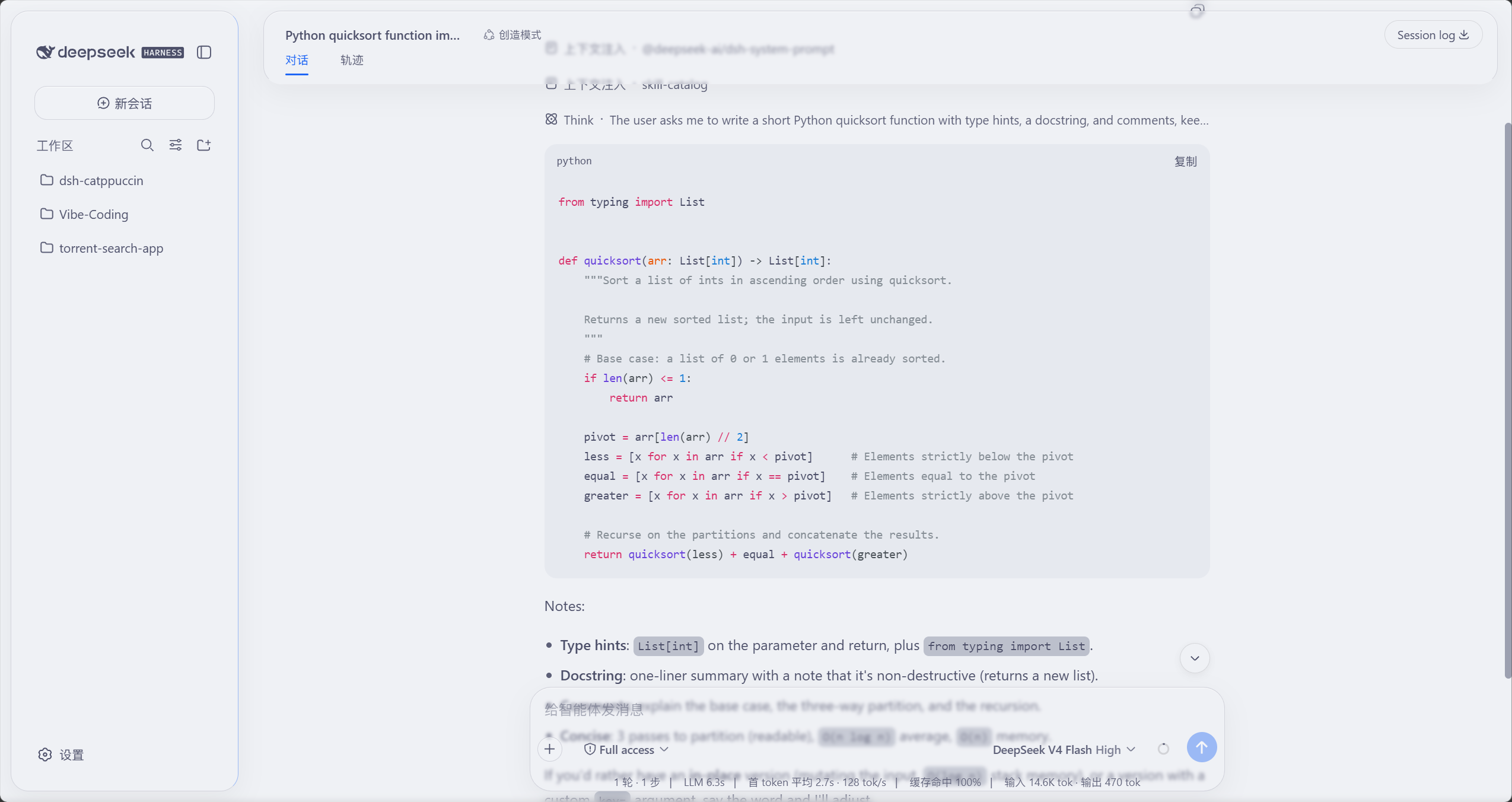
玻璃质感(Mica 云母模式)
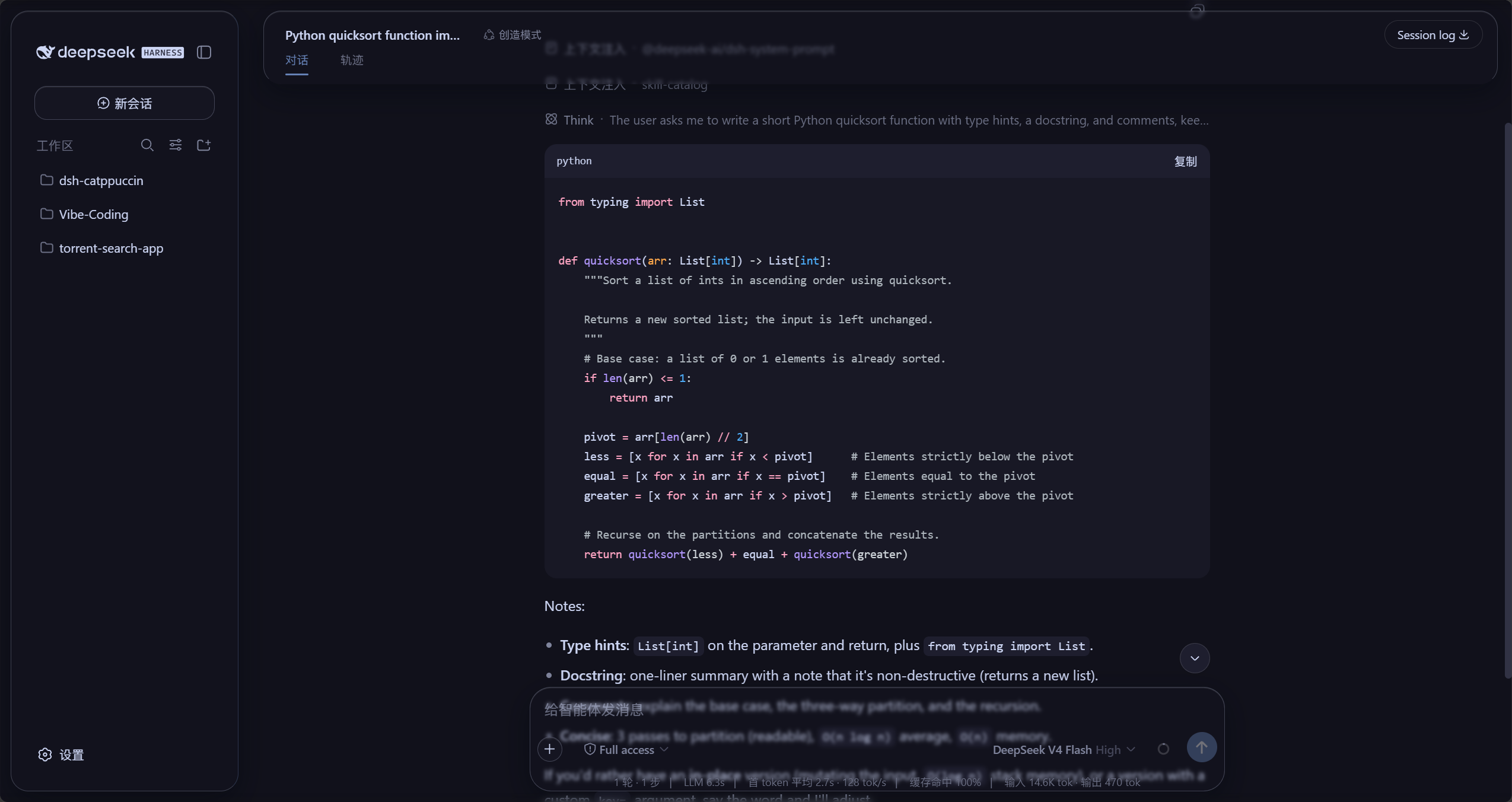
同一会话在浅色(Latte)与深色(Mocha)下的磨砂玻璃效果:顶栏、侧边栏、
聊天气泡、输入框与统计行都是玻璃卡片,消息滚过页面边缘时被柔化,
背景为主题底色的纯色(截图来自本地 GUI):
🌻 Latte(浅色玻璃)
 🌿 Mocha(深色玻璃)
安装
方式一:从 npm 安装(推荐)
dsh plugin --profile web add @nonamelego/dsh-catppuccin
装完重启 dsh web 即可,dsh plugin 会自动把它加进 profile 的 bundles。
其他 profile 把命令里的 web 换成对应名字即可(如 headless)。
DSH Desktop:桌面版默认激活的 profile 就叫 desktop,把命令里的 web
换成 desktop 即可:
dsh plugin --profile desktop add @nonamelego/dsh-catppuccin
在桌面的 DSH 终端里运行即可(dsh plugin 默认作用于当前激活的 profile,
若在托盘里选了别的 profile 就换成那个名字),装完重启 DSH Desktop 生效。
从仓库安装的方式同理:dsh plugin --profile desktop add https://github.com/NoNameLeGo/dsh-catppuccin-theme。
方式二:从仓库安装
dsh plugin --profile web add https://github.com/NoNameLeGo/dsh-catppuccin-theme
从 git 安装时 pnpm 可能要求允许构建脚本——按 pnpm 的提示把对应包加进 profilepnpm-workspace.yaml 的 allowBuilds 后重跑一次即可。
dsh-TUI(终端版)主题
与 Web GUI 插件同一个包。用标准的插件安装命令装进 dsh-tui profile:
dsh plugin --profile dsh-tui add @nonamelego/dsh-catppuccin
从仓库安装同理(npm 版尚未发版时可用 git 形式,效果一致):
dsh plugin --profile dsh-tui add https://github.com/NoNameLeGo/dsh-catppuccin-theme
包里带一个只做主题同步的小插件行(dsh-catppuccin-tui-themes,不依赖任何服务):dsh-TUI 启动时自动把四套主题 JSON 同步到 ~/.dsh-tui/themes/,之后升级包即同步新版配色。装完启动 dsh --profile dsh-tui,在 dsh-TUI 里用 /theme 选择 Catppuccin Latte / Frappé / Macchiato / Mocha,或直接 /theme catppuccin-mocha 切换(选择会持久化,下次启动自动恢复)。
💡 已为 Web GUI 装过本插件、同时用 dsh-TUI 的话,无需重复安装:Web 端每次
启动会自动同步主题到~/.dsh-tui/themes/(仅当该目录已存在)。
📁 不想装包也可手动复制:把
themes/*.json拷进~/.dsh-tui/themes/
(Windows:%USERPROFILE%\.dsh-tui\themes\),只是不随版本自动更新。
⚠️
catppuccin-*.json归本插件所有、同步时会被覆盖;想自定义请改名另存。
💡 TUI 主题只管 TUI 内部配色,终端背景由你的终端决定——建议也配上对应
风味的 Catppuccin(见 Catppuccin ports 列表),观感最一致。
使用
- 打开 Web GUI(默认
http://127.0.0.1:3080);在 DSH Desktop 中则直接打开桌面应用即可。 - 进入 设置 → 常规。
- 在 外观 区域下方找到 Catppuccin 行,选择主题:
Latte(浅色)、Frappé、Macchiato 或 Mocha(深色)。 - 选择 跟随系统 则回退到官方主题——会还原你启用 Catppuccin 之前
的官方偏好(浅色 / 深色 / 跟随系统),而不是强制重置。
玻璃质感
在 设置 → 常规 的 Catppuccin 主题 正下方找到 玻璃质感 行:
- 总开关:开启后顶栏、侧边栏、输入框、统计行、轨迹视图变为磨砂玻璃;
关闭即完全还原原生界面(无需刷新)。 - 模式:云母效果把界面改成悬浮磨砂卡片;兼容模式保持原版排版,
只把材质换成玻璃。 - 预设:清透 / 标准 / 磨砂 三档一键套用;想微调再用下面的滑条
(当前旋钮值与某档一致时该档高亮)。 - 玻璃模糊度(0–40 px)、磨砂度(0–100%):控制玻璃的模糊半径与
不透明度。 - 背景亮度:深色模式 0–50 压暗、浅色模式 50–100 提亮(50 为原样),
直接调和进纯色背景。
玻璃配色自动跟随当前主题,切换 Latte / Frappé / Macchiato / Mocha 时即时
变色;所有设置跨重启自动恢复。
检查 Catppuccin 插件更新
在 设置 → 常规 的 玻璃质感 正下方找到 检查 Catppuccin 插件更新 行:
- 点击 检查更新 即对比 npm 上的最新版与当前版本:已是最新 → 显示当前
版本号;发现新版 → 显示新版本号并给出可复制的升级命令(命令中的 profile
名自动探测,无需手动替换;探测失败才回退为web)。 - 本插件为本地链接 / 源码安装(
link:/file:/ git)时不显示 npm 升级
命令,会提示改用git pull或重新构建。 - 通道策略:正式版只跟随
latest标签;预发布版同时跟随beta(升级命令
自动带@beta)。离线或网络失败时显示原因并可重试。
玻璃拟态(Glassmorphism)
玻璃拟态是一种视觉风格:界面面板像一片磨砂玻璃——半透明填充、
背景模糊(backdrop-filter: blur())和玻璃细节(描边、内高光、柔和投影),
透过它能看到并柔化背后的内容。
本插件的具体效果:
- 七个区域玻璃化:顶栏、侧边栏、输入框、统计行、轨迹视图、聊天气泡
和新会话按钮;云母模式下成为带圆角的悬浮卡片,聊天内容滚动时从玻璃
下方穿过、被模糊;折叠侧边栏时导航条同样悬浮在聊天区边缘; - 页面边缘渐变模糊:视口上下各有一条渐变模糊带,消息滚到边缘时被
柔化穿过——内容在边界「融化」(借鉴
DSH-Transparent-UI-Plugin
的 Aqua 皮肤); - 配色自动跟随主题:Latte 是浅色玻璃、Mocha 是深色玻璃,切换主题即时
变色;页面底色取当前主题纯色,背景亮度旋钮直接往纯色里调和白/黑; - 一键开关:关闭即完全还原原生界面,插件卸载不留任何残留。
开发
pnpm install
pnpm typecheck   # tsc --noEmit 类型检查
pnpm test        # vitest 跑配色表 / 契约 / e2e 覆盖测试
pnpm build       # tsdown 构建 -> lib/index.js(服务端)+ lib/client.js(浏览器)
配色表由生成器脚本产出——修改 scripts/generate-palettes.mjs 后重跑
(--pin <sha> 可把上游 commit SHA 写进 palettes.ts 头部,见docs/plugin-improvements.md 的 L 项):
node scripts/generate-palettes.mjs [--pin <upstream-sha>]
对外 API(./client、./tui-themes 子路径导出)的 typedoc 文档生成到docs/api/(GitHub Pages 发布交给 maintainer):
pnpm docs:api
贡献指南见 CONTRIBUTING.md;状态契约的版本迁移约定见
docs/state-migrations.md。
本地链接调试
克隆到本地后,把包链接进 profile 并加入 bundles(路径换成你自己的):
pnpm --dir C:\Users\LeGo\.dsh\profiles\web add link:D:\Vibe-Coding\dsh-catppuccin
再把 @nonamelego/dsh-catppuccin 加进 profile package.json 的dsh.profile.bundles,重启 dsh web。DSH Desktop 用~/.dsh/profiles/desktop 对应路径。
🙋 常见问题
- Q: "为什么外观行里看不到 Catppuccin 主题?"
A: 官方外观行只列出内置的浅色/深色/跟随系统偏好。四个主题在它正下方的
Catppuccin 行里。 - Q: "我的主题选择是怎么记住的?"
A: 选择持久保存在 DSH 的官方 settings 文档(catppuccinnamespace,存于
DSH home 下,同一台机器的 DSH 共享这份偏好),浏览器 localStorage 作为
即时缓存与多标签页同步。因此普通dsh web、dsh web --port自定义端口,
以及 DSH Desktop(每次启动用随机回环端口)都能跨重启自动恢复;玻璃质感
开关与各旋钮同样持久保存。0.5.0 起旧版catppuccin-state.json会在首次
启动时一次性迁移进 settings 文档(文件保留作回退)。 - Q: "怎么知道这个插件有没有新版本?"
A: 设置 → 常规 → 检查 Catppuccin 插件更新 一键检测本插件在 npm 上的最新版本,
发现新版会给出可复制的升级命令;也可以随时手动执行dsh plugin --profile web update @nonamelego/dsh-catppuccin
(或重新add最新版)。在 DSH Desktop 中,把web换成desktop
(dsh plugin --profile desktop update @nonamelego/dsh-catppuccin),
或者直接在 DSH 终端里运行dsh plugin update(默认作用于当前 profile)。
💝 致谢
- Catppuccin 提供的色板与 port 模板
- DeepSeek Harness 的插件体系
- DSH-Transparent-UI-Plugin
的玻璃质感交互与实现参考(云母 / 兼容双模式、模糊度 / 磨砂度等旋钮设计)

Copyright © 2021-present Catppuccin Org

评价与评分
登录后即可为该插件评分和评价。
还没有人评价这个插件,来抢个沙发吧!